
Dismantling the UEFI HII Database (Part 2)
UEFI ·This is the second part of the series - please refer to the first part here. The first part introduces Internal Forms Representation (IFR) and an overview of how a driver might utilize the UEFI HII framework to publish its user-configurable items. The second part is complementary to the later half of the first part.
UEFI EDK2 contains VfrCompiler utility, which compiles the human readable VFR format into IFR opcodes. In this entry, we focus on decompiling IFR opcodes to human-readable format and retrieving associated UEFI variables with each configurable item in the BIOS menu. It is beneficial in scenarios where either the setup utility of the BIOS is not present or minimum user interaction is required to modify certain BIOS menu items.
In this entry, the major focus will be on some basics of the FORM package. Furthermore, I will provide an UEFI shell application to retrieve and parse IFR forms and disassemble them in a human-readable format along with associated UEFI variables and corresponding varstores. I will also provide a json-c port for convenient representation of the data.
FORM Package
The HII database consists of several packages packed in the HII database. The packages can be of different types, identified by the Type field of the header struct of individual packages. Referring to UEFIInternalFormRepresentation.h, the Type of FORM package is resolved with the following eight-bit value:
#define EFI_HII_PACKAGE_FORM 0x02
EFI_HII_PACKAGE_FORM is the most important type of the package, as it identifies:
- The sequence and the hierarchy of different sub-menus/forms
- Describes the content of each sub-menus/forms
- The associated varstores with each set of forms
- Variable index associated with each configuration item on the form
- Type of each user-configurable displayed on the menu
Let’s have a brief overview of the Form package.
THE FORM package is a hierarchical database; therefore, there are parent->child relationships. If we pick apart the database top-down, the topmost entity is FORM_SET.
FORM_SET consist of all the forms associated with each other. A FORM_SET can identify all the associated VARSTORES and GUID. The next important hierarchical entity is FORM, which identifies the content displayed on a menu. A BIOS menu is typically shown hierarchically, where the topmost menu page might contain a certain sub-menu. For example, consider the following screen as shown by the Tianocore browser
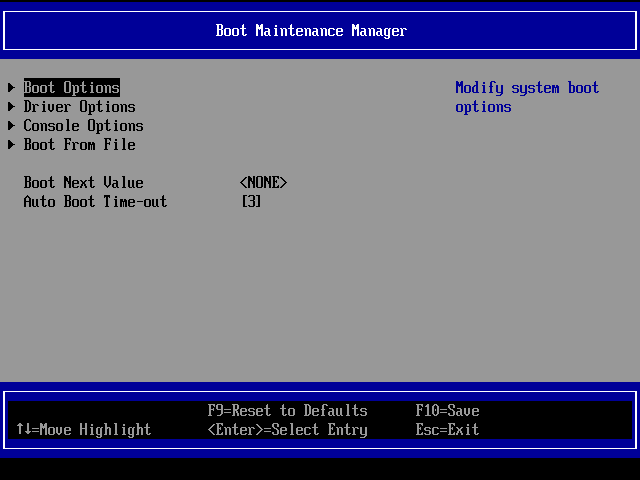
The sub-menu shown above is referred to as FORM. On the top, you have the title of the form. On the grey screen, the content of the form is displayed. Similarly, in the footer, you have Tianocore browser-specific navigation menu. As you can see, the content type differs; the first four entries point towards another sub-menu/forms; therefore, they are identified as FORM_REFERENCES. References are not defined in this particular form. As the name suggests, they refer to other forms within the Formset. For easier understanding, they can be considered as pointers to FORMS.
Immediately below, we have a field called Boot Next Value, which presents multiple options. This type of field is called OneOf and it is described within the scope of the current form. Similarly, the last field is Numeric, which allows you to enter a number value within a certain range, also defined in the scope of the current form.
As we have already mentioned Scope, let’s identify it in the context of IFR. Scope describes the hierarchical relation of the entities. A zero scope entity (i.e., the Scope field is equal to zero in the header) contains no children. In contrast, a one-scope entity identifies all the following entities as its children until the END opcode is encountered.
The previous blog entry described that the IFR database is a packed data form representation. Typical representation is in the form of a data header and then a payload. For instance, the entity Boot Maintenance Maanger is a FORM, identified by a certain Opcode within the database. Typically, the Scope field of the FORM header is 1, which implies that whatever follows the FORM header is within the scope of the current FORM until encountered by an END opcode. For instance, in the case of Boot Maintenance Manager, we have four REFerence_FORM entities, one OneOf and one Numeric entity as part of the current scope of the FORM. Each child entity is identified by their Opcodes and defined by the corresponding headers as laid out in the UEFI specs.
Having had a brief introduction, let’s look into my implementation of the UEFI shell application of IFR disassembly. The symbol main identifies the entry point for the application from the user’s perspective. In the following code sequence, we first identify the HII DB Protocol by a specific GUID. It is a standard practice in the UEFI framework, as a unique GUID identifies each registered protocol. Some of the common GUIDs are part of UEFI tool database. As also typical of the EDK2 UEFI framework, HiiDBProtocol exposes interfaces/functionality for its users. One such interface is ExportPackageLists, which copies all PackageLists registered with this protocol into a buffer. Each PackageList can contain multiple packages, one of which could be a FORM package, as mentioned at the start of this blog.
    Status = gBS->LocateProtocol(&gEfiHiiDatabaseProtocolGuid, NULL, &HiiDBPr);
    if (EFI_ERROR(Status))
    {
        DEBUG((EFI_D_WARN, "Error Locating Hii DB Protocol - %r \n", Status));
        return EFI_DEVICE_ERROR;
    }

    Status = HiiDBPr->ExportPackageLists(
        HiiDBPr,
        NULL,
        &PkgListSz,
        HiiPkgLsts);

    if (EFI_BUFFER_TOO_SMALL != Status)
    {
        DEBUG((EFI_D_ERROR, "Error in determining Pkg List Size %r\n", Status));
        return EFI_PROTOCOL_ERROR;
    }

    Status = gBS->AllocatePool(EfiBootServicesData, PkgListSz, &HiiPkgLsts);

    if (EFI_ERROR(Status))
    {
        DEBUG((EFI_D_ERROR, "Error Allocating Space  %r\n", Status));
        return EFI_OUT_OF_RESOURCES;
    }

    Status = HiiDBPr->ExportPackageLists(
        HiiDBPr,
        NULL,
        &PkgListSz,
        HiiPkgLsts);

    if (EFI_ERROR(Status))
    {
        DEBUG((EFI_D_ERROR, "Error Exporting Pkg Lists %r\n", Status));
        gBS->FreePool(HiiPkgLsts);
        return EFI_PROTOCOL_ERROR;
    }
Next, we iterate over the PackageLists. Each Package list can contain multiple packages. In a Package List, there could be a string package, as introduced in the last entry. Therefore, we call the GetStrings function to extract English strings (if any) and create a hash table saving the pointer of EFI_STRING against each index. The reason for doing it earlier than Parsing the Form package is that it uses these strings by identifying them against a string id. For instance, the text displayed on the Boot Maintenance Manager screen is part of the String package, which is linked with the form entities through the numeric id. Once we have the hash of it, we can comfortably associate text used by FORM entities through the indexing of the array data structure.
Finally, we call the ParseFormSet function as below:
ParseFormSet(
    OpHeader,
    &FileHandle,
    StringHashTableData,
    root);
If you recall from our earlier discussion, FORMSET is the top entity of FORM_PACKAGE. The parsing of FORM package draws some similarities with a disassembler. As we read through the packed data, we identify the OpCodes. It is done in a while loop. The reason for that is simple, in this configuration, we can skip over certain Opcodes if they are irrelevant to us. For instance, in the current implementation, my main goal was to capture all the UEFI variables associated with forms. Hence, I skipped some of the options. Following is a brief overview of each OpCode:
EFI_IFR_FORM_SET_OP: The top entity of the Form package. Contains forms, varstore and other information.EFI_IFR_GUID_OP: Opcode for the GUID. Associates the forms with a unique GUID.EFI_IFR_FORM_OP: Contains the description of a form; similar to the example ofBoot Maintenance Manager.EFI_IFR_SUPRESS_IF_OP: Suppresses the entities within its scope if the following expression (also within its scope) is true.EFI_IFR_GRAY_OUT_IF_OP: Grays out the entities within its scope if the following expression (also within its scope) is true.EFI_IFR_TEXT_OP: Display text on the formEFI_IFR_REF_OP: As described, it is a pointer to another form. It may contain forward references to the other forms yet to be introduced/described.EFI_IFR_CHECKBOX_OP: Describes a checkbox shown on a certain form.EFI_IFR_NUMERIC_OP: Describes a numeric entry field on a certain form.EFI_IFR_STRING_OP: Describes a string entry field on a certain form.EFI_IFR_ON_OF_OP: Describes the ‘OneOf’ (multiple options) entity displayed on a certain form.EFI_IFR_ONE_OF_OPTION_OP: Describes the precedingEFI_IFR_ON_OF_OPoptions.
There are many other OpCodes which are skipped. For an exhaustive list, it is recommended to go through UEFIInternalFormRepresentation.h.
As described in point 7 above, some Opcode might contain forward references. To resolve them, we need to have a symbol table-like structure. For the current implementation, I have used an EDK2 implementation of a linked list which contains all the unresolved symbols. The while loop structure makes it easier to skip or add OpCodes as per the preferences.
I hope the above explanation provides a brief overview. Feel free to check out the full implementation. The current implementation does not include exhaustive disassembly. The main purpose was to extract UEFI variable location associated with each configurable item in the forms. Similarly, the parsing can take 5-6 minutes on certain real Forms. Adding more Opcodes will certainly increase the time. I intend to further improve on it. You are also very welcome to contribute.
Data Representation
As these forms have relational data, storing them in a convenient format might be worthwhile once you have retrieved the relevant items from IFR. For this reason, I incorporated json-c library in my EDK2 framework. It makes it quite convenient to create and store json objects for further processing or simply write it out in a file. json-c lib heavily relies on libc, and fortunately, EDK2 provides us edk2 flavour of libc port. Therefore, porting of json-c to EDK2 was relatively simple. Check out my port here. There are some opens which I haved identified, the major one being unicode string support. You are very welcome to contribute as well.